Free Competitor Analysis Template for PowerPoint (2026 Edition)
Your boss just asked for a quick update on the competitive landscape. You have competitor notes, screenshots, pricing pages, maybe a few traffic estimates, but no clean way to present them.
This PowerPoint template gives you a simple structure for that meeting.
Use it to compare your top competitors, show where they are stronger or weaker, and turn the research into a short action plan. You fill in the slides with your own data instead of spending the afternoon moving boxes around.

What is inside the competitor analysis PowerPoint template?
The template has 8 slides. It starts with a simple competitor overview, then moves into comparison, traffic channels, SWOT, and next steps.
Slide 1: Title slide
- Open with a clean “Competitor Analysis Report” cover and a short subtitle for the market landscape or reporting period.
Slide 2: Competitor overview
- List your top three competitors and add a short note on their target market and main value proposition.
Slide 3: Competitive feature matrix
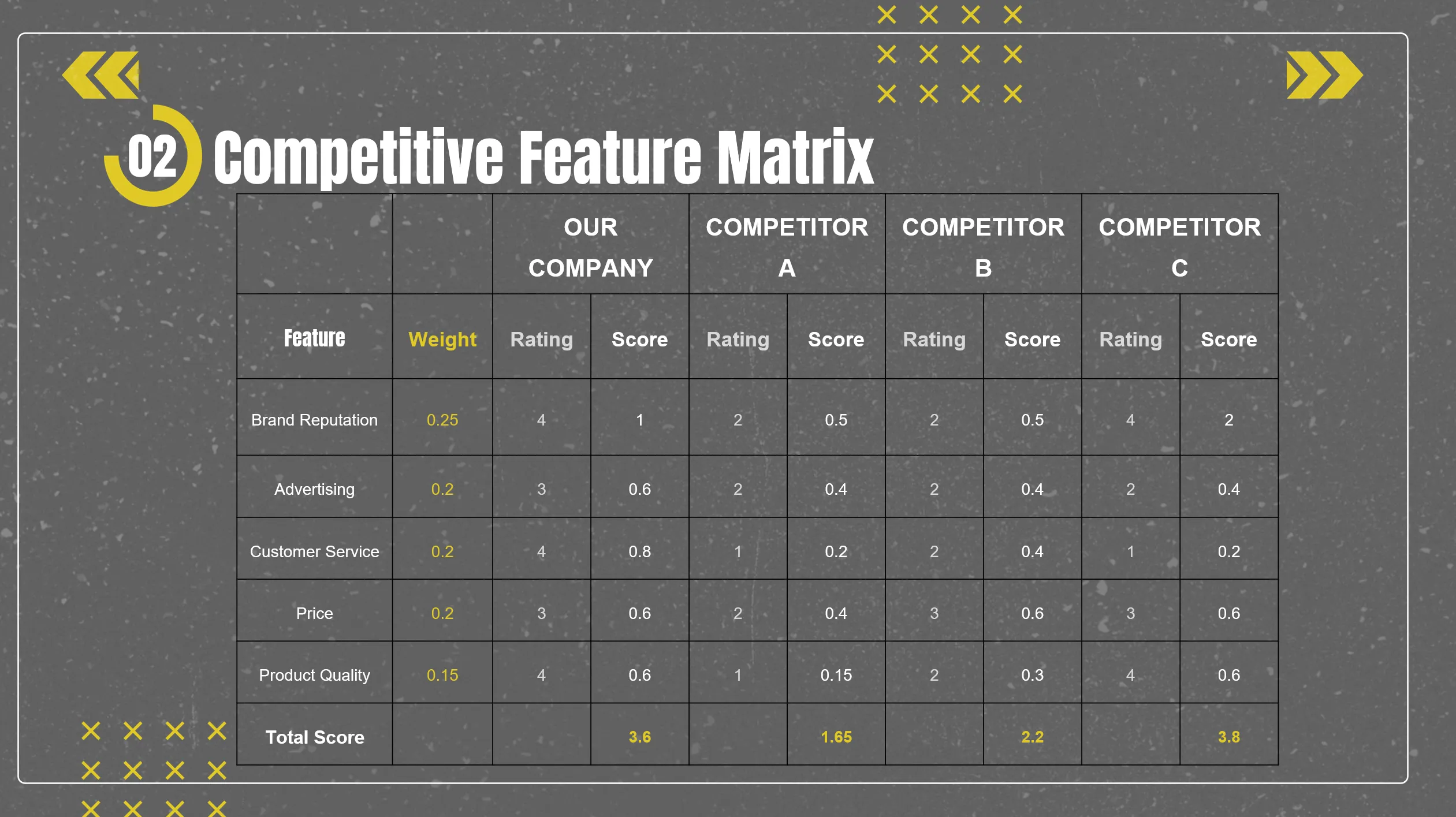
- Compare each competitor across brand, ads, customer service, price, and quality. The scores help show where you are ahead and where you may need to catch up.
Slide 4: Traffic and acquisition channels
- Show where competitors get traffic from across SEO, social, and paid ads. Use the notes area to explain what the mix tells you.
Slide 5: SWOT analysis
- Sort your findings into strengths, weaknesses, opportunities, and threats.
Slide 6: Action plan
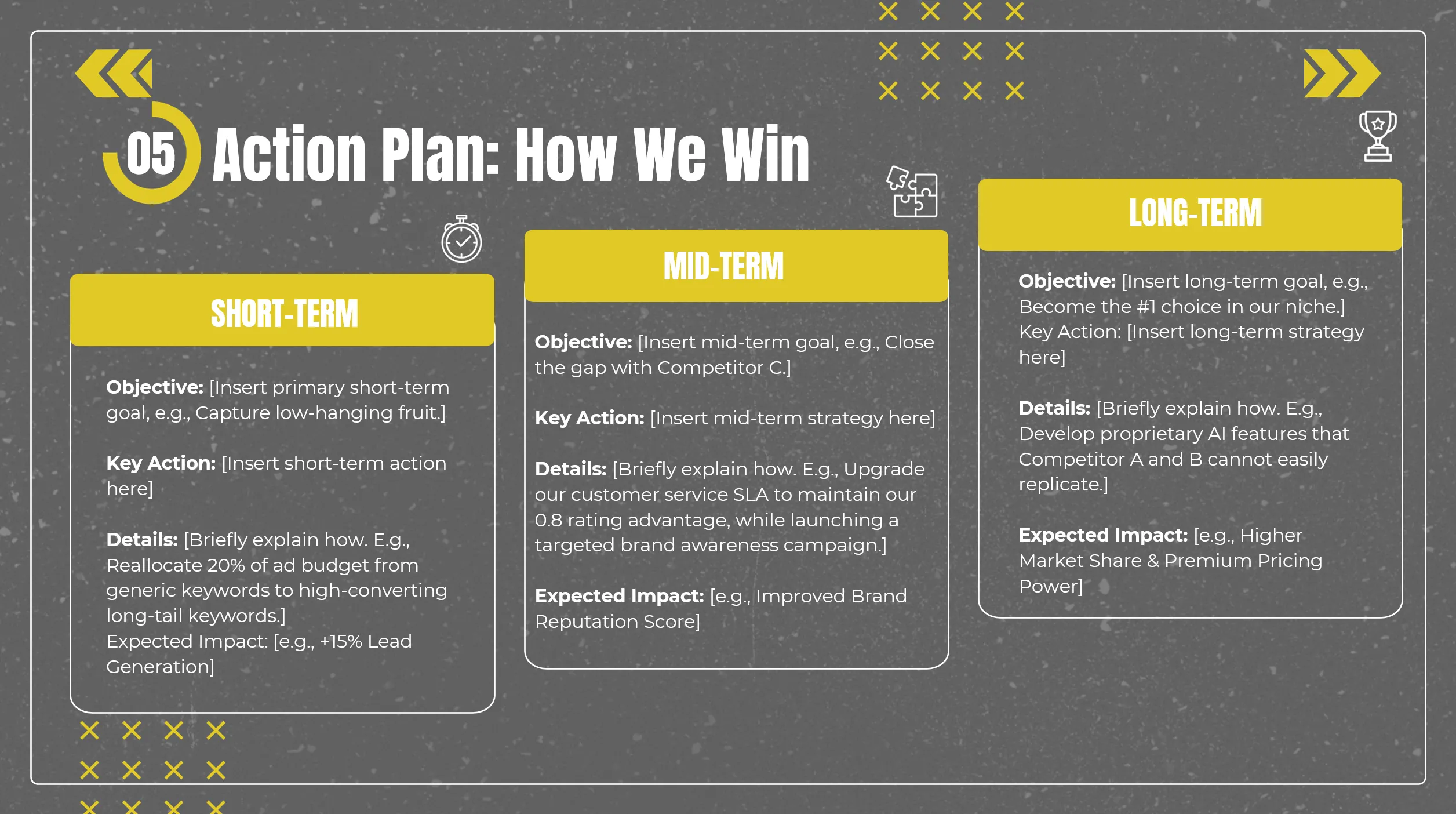
- Turn the analysis into three practical next steps, from quick wins to longer-term plans.
Slide 7: Closing and Q&A
- Close the report and leave room for questions from your team, boss, or client.
Slide 8: Resource page
- Copy the icons, fonts, and other design resources from this page when you want to adjust the deck.
How to use this competitor analysis template?
Do not start with only three competitors. The template has room for three, but you should look at more before choosing them. Search your main keywords, check the first page of Google, and note who appears in organic results, ads, comparison pages, review sites, and marketplaces.
Then pick the three competitors closest to your product, audience, or sales process.
Before filling in the PowerPoint template, collect the basics: product pages, pricing pages, customer reviews, social channels, recent campaigns, search results, and traffic data from tools like Similarweb, Semrush, or Ahrefs.
Use the competitor overview slide for short descriptions. Use the feature matrix to score each competitor with the same rating scale, then adjust the weights based on what matters in your market. Use the traffic slide to compare SEO, social, and paid acquisition. (If you are new to this, you can start with Similarweb’s website traffic checker.)
Turn the notes into SWOT points only after you have evidence. Then use the action plan slide to write short-term, mid-term, and long-term recommendations.
When you present the deck, use the BLUF method: give the bottom line first, then show the evidence. Start with the conclusion, support it with the matrix, traffic data, and SWOT, then close with the action plan.
Why this PowerPoint template is structured this way?
A competitor analysis presentation should not be a list of company names. It should help people understand who the competitors are, how they compare, where they get customers, and what your team should do next.
The deck follows that order:
1. Start with the competitors.
- The overview slide gives your audience enough context before you move into scores and charts.
2. Compare factors that shape buying decisions.
- The feature matrix looks at brand reputation, advertising, customer service, price, and product quality. These are not the only factors you can use, but they give you a practical starting point.
3. Look at acquisition, not just product.
- The traffic slide helps you compare SEO, social, and paid channels, because a weaker product can still win attention if its acquisition strategy is better.
4. Turn the research into a decision.
- The SWOT slide helps organize the findings. The action plan slide turns those findings into short-term, mid-term, and long-term next steps.
5. Leave space for the meeting itself.
- The closing slide gives you a place for Q&A, and the resource page makes it easier to adjust the design before you present.
Ready to use this template?
Download the free PPTX template, add your competitor data, and use it for your next market review or team meeting.